Rocket
Sunday, Jan 04, 2026 · 1590 words · approx 5 mins to readMy move away from the Mac after almost 20 years didn’t happen by me installing Arch btw on the last Mac I was using at the time. I got going on a new PC instead, leaving the Mac behind completely.
That new PC was initially a gaming system I built back in late 2022, but I wasn’t using it for that—or indeed using it at all—at the time. So when I made the decision that I was done with the Mac as my daily driver because it was so riddled with bugs and so slow, yet with no way to fix those problems or influence Apple to fix them for me, I used that system rather than build something new yet again.
I can’t remember the exact base spec at the time, other than it had a Ryzen 9 7950X3D (Zen4-based) processor and a Radeon 7900 XTX (Navi31-based) GPU, plugged into a high-end X670E-based mainboard from ASUS. Both were the pinnacle of AMD’s respective consumer CPU and GPU product lines at the time I started to use the system in earnest in very early 2025, and I had it all crammed into a FormD T1, a tiny case about the size of a shoebox with less than 10 litres of internal volume.
When AMD released new CPUs and GPUs in early March, I decided to treat the system to upgrades to re-baseline the system on the very best retail consumer hardware I could get my hands on. I try not to buy new PCs more often than every 5-6 years, so I figured why not. The 7950X3D and Radeon 7900 XTX would have been fine, but the new Zen5-based CPUs released in March implemented support for PCI Express 5.0 for both GPUs and NVMe storage, and AMD’s new GPUs supported it too.
The GPUs also brought with them better support for running very high refresh rate displays at low power, with better display controllers and manipulation of the GDDR6 VRAM used to feed those controllers with frames at high rates. I decided to bank that lower power operation given I still wanted to use the FormD T1 as the case.
That meant the system got a new CPU, GPU and gen5 NVMe storage, along with some other smaller supporting upgrades to the existing case, cabling and cooling systems. The end result is a tiny, almost completely silent powerhouse that feels incredibly responsive to use. I called it rocket. Here’s rocket’s full spec:
| CPU | AMD Ryzen 9 9950 X3D |
| GPU | ASUS Radeon RX 9070 PRIME OC |
| Mainboard | ASUS ROG Strix X670E-I mainboard |
| Memory | 2 x 48GB DDR5-6000 CL30 |
| Storage | 2 x Crucial T705 2TB gen5 NVMe |
| Case | FormD T1 with expansion kit |
| CPU Cooler | NZXT Kraken Z53 AIO 240mm liquid cooler |
| Fans | 2 x Phanteks T30-120 fans |
| Cabling | LINKUP AVA5 PCIe 5.0 19cm ITX v3 |
| PSU | Corsair SF750 w/custom 17AWG silicone cables |
The LINKUP PCIe riser cable was the only option at the time that fit really snugly into the T1 and allowed for routing between the mainboard and GPU. The GPU lives directly behind the mainboard in a T1, and upside down, so any PCIe riser cable you use to connect the two needs to loop under the bottom of the mainboard after fitting into its PCIe x16 slot, run up the back, and then loop over again to meet the GPU. So you need a “double reverse” cable type that takes that layout into account.
The T1 expansion kit adds 16mm of extra internal space at the top or bottom of the case depending on which side you use it, making it essential to allow for fitment of the 30mm thick Phanteks T30-120 fans underneath the Z53’s radiator.
Lastly, the custom PSU cabling is essential when building into a tiny shoebox-sized case like the T1. The standard cabling for any PSU is always going to be far too inflexible, so if you want to be able to route those cables easily and get them exactly where they need to go with very little slack then you need to invest in custom cabling.
Thankfully there’s a thriving tiny PC building and modding scene with plenty of suppliers of things like custom PSU cabling to get everything in your little system to fit just so.
To give you a sense of just how small it is, here’s a picture of it sat on top of my main work system which is built into a Fractal Design North.
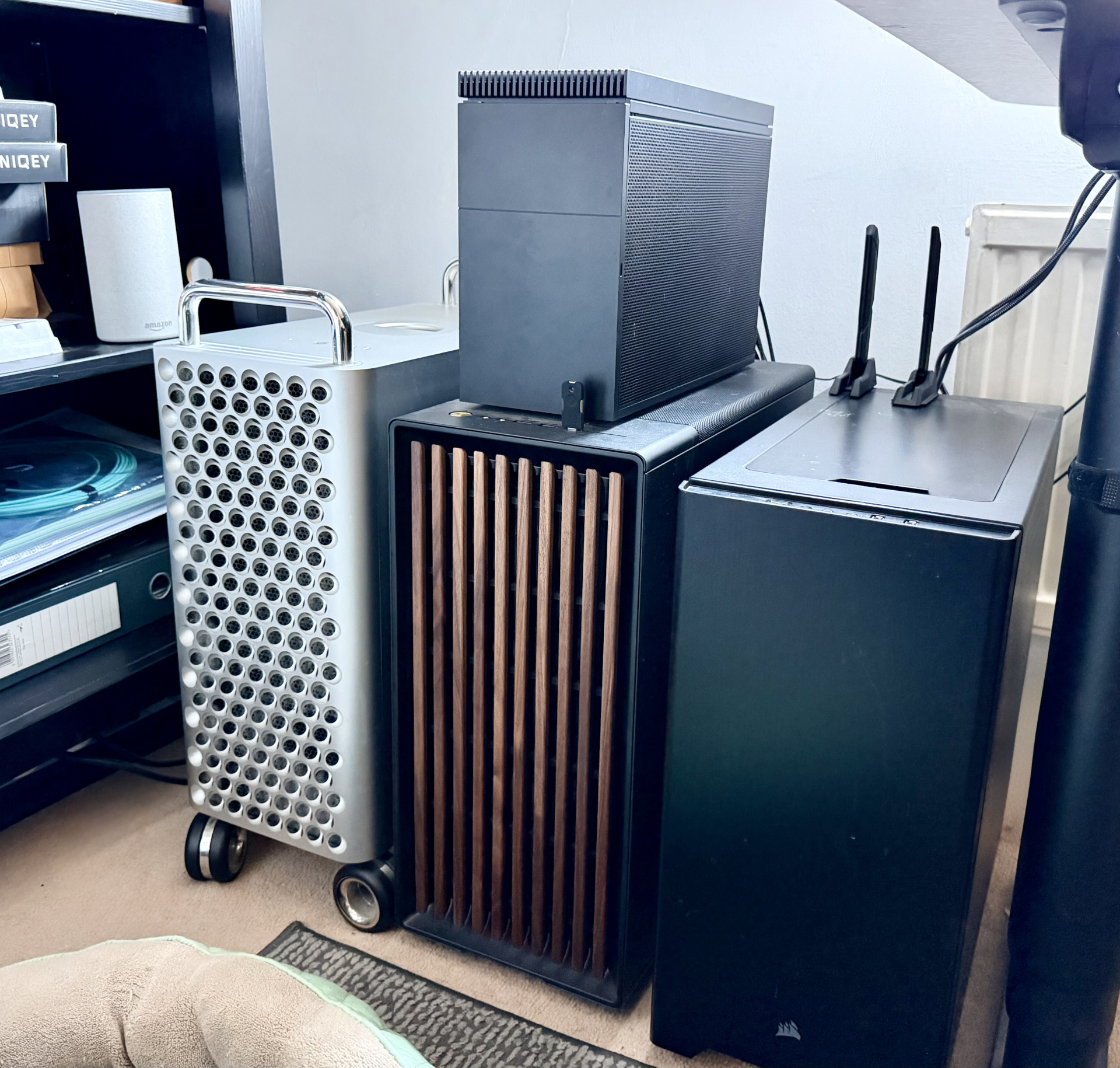
FormD T1 atop a Fractal Design North
If you’ve never taken a look at a case like the T1 then it might be impossible to understand how a full PC ever has a hope of fitting into a space that small. The sandwich design is the key, moving the GPU behind the mainboard on the riser. Here’s the back side of the system where the GPU lives. Everything else in the system—chiefly the mainboard and the PSU—lives directly behind it on the other side.
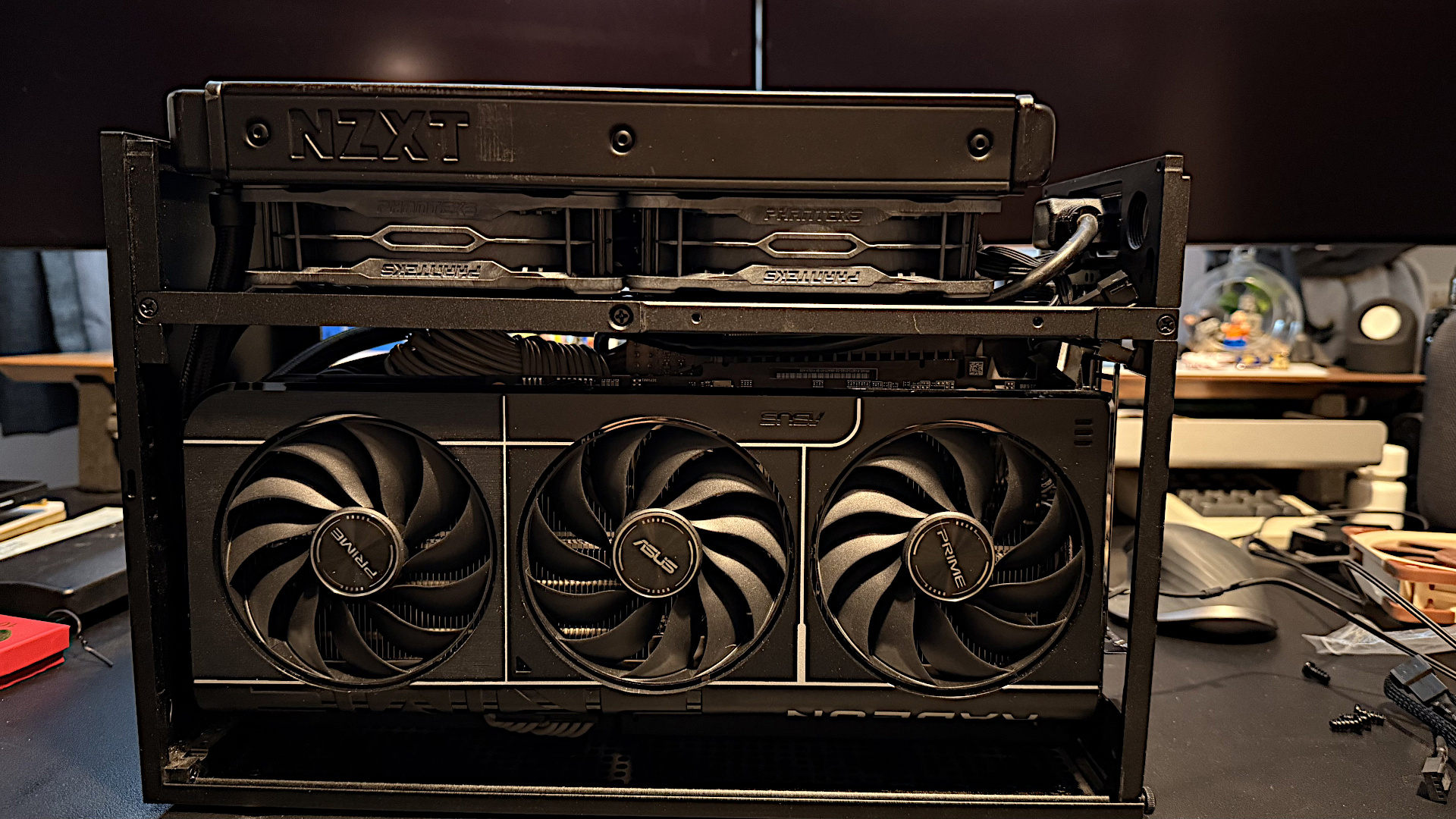
GPU side showing the Radeon RX 9070 and Z53 radiator on top of the T30 fans
The main property I wanted to carry over from the Mac Pro into any replacement was its silence in normal operation and the Z53 on the CPU and the low idle power (~25W) of the Navi48-based Radeon RX 9070 help achieve that. Right now, with almost nothing happening on the system other than me writing this post, the GPU fans turn off completely and the CPU temperature sits at a reasonably cool 50C, allowing the T30-120s that move air through the Z53’s radiator to spin at ~750rpm.
Unless I significantly push either CPU or GPU, the system doesn’t make a sound. When it does have some thermal load to deal with then there’s no way for it to cope with it as gracefully as the Mac did, which is a step backwards, but then it is much smaller and therefore has to compromise on the possibilities for cooling.
If I had to go back and build the system again then I don’t think I’d choose something like the T1. It’s simply too small, which makes it really fiddly to build into and means you have to make compromises when it comes to dealing with the heat your components make. I built into the T1 because it looks cool, not because I’m struggling for space or need to take it anywhere.
So that’s the gist of the new system: an incredibly powerful consumer CPU with near-silent watercooling, lots of RAM, and a power-efficient air-cooled GPU that doesn’t get too hot or too loud, backed by lots of incredibly fast storage. A modern Linux distribution is a dream on a system like rocket, with almost every interaction with the system happening instantly.
The displays I use—LG 32GS95s, which are 32” 4K240 OLEDs—have a lot to do with that. Running at 240Hz at the full 4K (which the Mac Pro can’t do, topping out at 4K144), desktop interactivity feels really good, and the Radeon RX 9070 GPU can run the pair of them at ~25W without pushing the GPU core or the GDDR6 up significantly over their baseline idle clocks.
I boot the Mac Pro once a week now to have a FaceTime call with a friend, and it has a drastic difference in performance in all areas, starting from how slow it is to boot to the desktop with it only getting worse from there. There are aspects of the overall use of a modern Mac that I miss a little, which I’ll write about when I talk about the software side of the new system in the future, but mostly there’s been very little looking back, even after that exciting honeymoon period of using a new system for daily work had worn off.